Every interaction with a large language model begins with a prompt — the text you send in. The quality of that prompt often makes the difference between a useful answer and a generic one, or between hitting the right output format on the first try and iterating three times to get there. Modern models are forgiving enough that a one-line question usually works, but a little discipline about how you ask pays disproportionate dividends — especially when the output will be consumed by a downstream system rather than read by a human.
This chapter is deliberately hands-on rather than theoretical. We work through the core prompting techniques using Google AI Studio (https://llm.generate(prompt) in Python, prompt is just the string you learned to construct in AI Studio. Settle into the playground first; move the patterns into code later.
Zero-Shot, Few-Shot, and the System Prompt
The simplest prompt is zero-shot: you describe the task, provide the input, and rely on the model’s pre-trained knowledge to produce the output.
Classify the text into neutral, negative, or positive.
Text: I think the food was okay.
Sentiment:
Zero-shot prompts work well for anything the model has seen many similar examples of during pre-training — sentiment classification, summarization, translation, simple Q&A. They fail when the task is domain-specific, when the output format matters, or when your notion of “correct” does not match the model’s defaults.
Few-shot prompting addresses the second and third problems by embedding a handful of input-output examples directly in the prompt, so the model can see what a good response looks like before generating its own.
Classify the text into neutral, negative, or positive.

Example: The food was awesome.
Sentiment: positive

Text: I think the vacation is okay.
Sentiment:
Research has surfaced a counterintuitive finding about why few-shot actually works in large models: larger models learn mostly from the format of examples, not from the labels themselves. Wei et al. (2023) showed that deliberately flipping the labels in few-shot examples barely hurts large-model accuracy on many tasks, while the structural consistency of the examples matters enormously. The practical implication for you is to put your energy into keeping the example format clean and consistent, rather than agonizing over which particular examples are most “informative.”
A third prompting scaffold is the system prompt — persistent context that applies to every user turn in a conversation. In AI Studio you set the system prompt in a dedicated field before starting a chat; in the Python API you pass it as a separate system_instruction argument. System prompts are where to put the persona, guardrails, and formatting requirements that should survive across an entire session, so they do not have to be repeated in every user turn.
The PICFAT Framework
For prompts that go beyond a one-line question, six components together cover almost everything you might need to specify. We call this checklist the PICFAT framework:
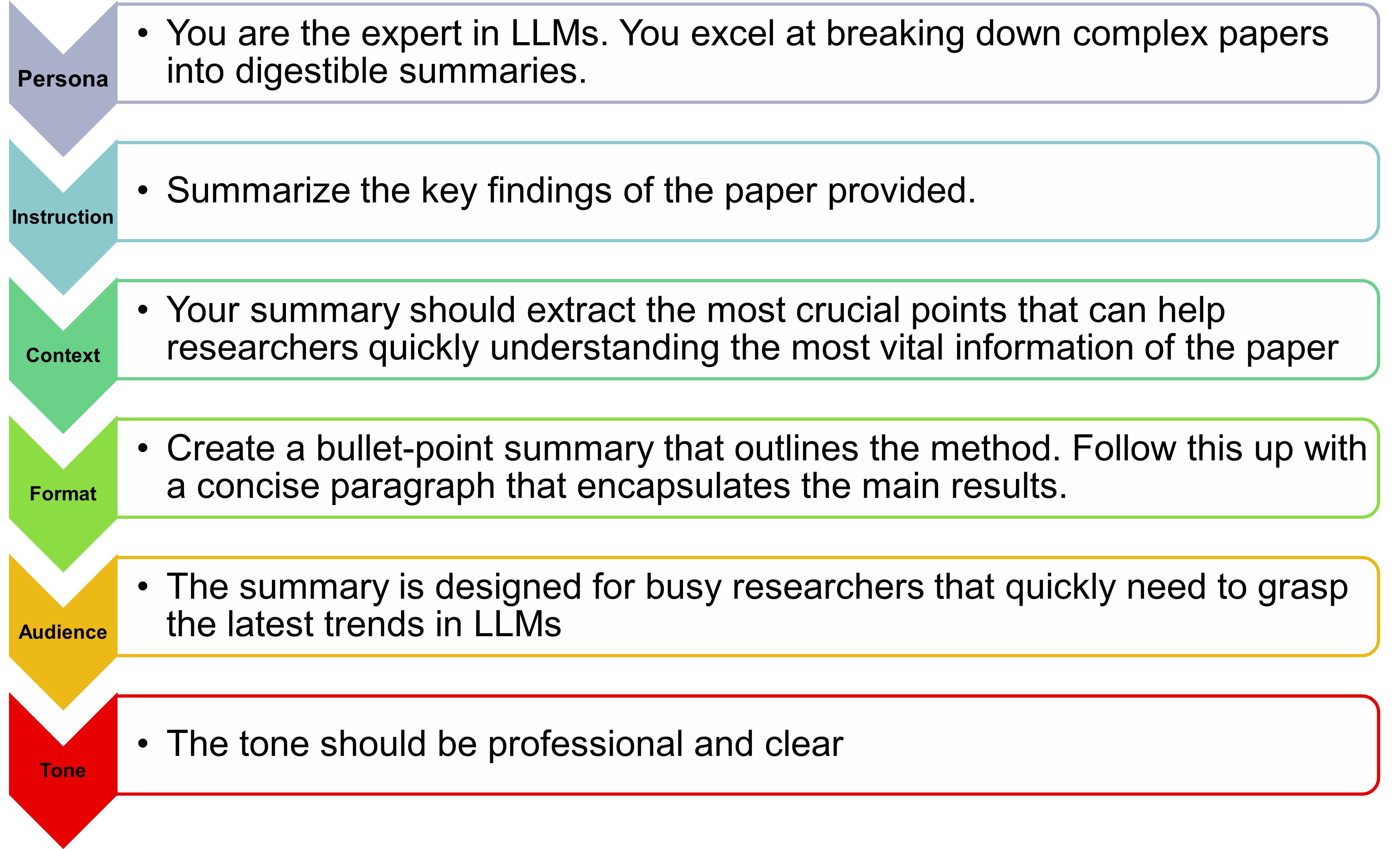
Figure 1:The PICFAT framework: Persona, Instruction, Context, Format, Audience, Tone. Only Instruction is strictly required; the other five are optional but each becomes valuable as the task grows in specificity.
Persona — identity and expertise: who the AI is pretending to be. Sets the vocabulary, the depth of explanation, and the perspective.
Instruction — the core mission: the specific, measurable goal. Prevents the model from drifting into related-but-irrelevant tasks.
Context — constraints and grounding: background information or data the model should treat as authoritative.
Format — structure and output: how the response should be organized. Saves you from reformatting afterwards (Markdown, JSON, tables, bullet lists).
Audience — the end user: who will read the output. Calibrates assumed knowledge and complexity.
Tone — stylistic nuance: the “vibe” of the response.
If your task requires data (a document to summarize, a table to analyze, a code snippet to review), that data goes in a seventh slot, typically fenced off with a code block or a clear delimiter so the model does not confuse the data with the instructions.
In practice, Persona and Format are the two you will add most often. Audience and Tone matter more the closer the output sits to content that will be read by humans, versus consumed by another system. The six-component prompt below is a useful reference template — note how each section maps cleanly to one of the PICFAT slots, with Markdown headings making the structure explicit:
# Persona
You are an expert in large language models. You excel at breaking down complex papers into digestible summaries.

# Instruction
Summarize the key findings of the paper provided.

# Context
The summary should extract the most crucial points that help researchers quickly understand the vital information.

# Format
Create a bullet-point summary that outlines the method, followed by a concise paragraph that encapsulates the main results.

# Audience
Busy researchers who need to grasp the latest trends in LLMs.

# Tone
Professional and clear.

---

[Paste paper text here]
Prompting Reasoning Models
The PICFAT framework was shaped by what worked on earlier instruction-tuned models like GPT-3.5, Llama 3, and the original Gemini. A newer class of models — OpenAI’s o1, Gemini 2.5 with thinking enabled, DeepSeek-R1, and others — is trained to generate internal reasoning chains before the final answer. These reasoning models do not need you to tell them to “think step by step” — they have been explicitly rewarded for doing so during training. What they benefit from instead is a tighter specification of what counts as a correct answer and what the response must avoid.
![A template for prompting reasoning models with six labelled slots — Role, Task, Background, Constraints, Style, Output — each containing a short bracketed placeholder such as "Expert [Job Title] with [X] years of experience" or "Do not include [X]; prioritize [Y]".](/AIHandsOnBook/build/PE_Reasoning-dc266fce7d64a05db94c4540a0aad167.png)
Figure 2:The reasoning-model template: Role, Task, Background, Constraints, Style, Output. Compared to PICFAT, the emphasis shifts away from “how should you think” toward “what does a correct answer look like, and what must it avoid?”
Role — who the AI is playing (usually more precise than Persona: “Expert [Job Title] with [X] years of experience”).
Task — the action verb and the deliverable, stated directly.
Background — data or context the model must use to ground the answer.
Constraints — what to avoid and what to prioritize. This is the single most valuable slot for reasoning models.
Style — the writing register for the intended audience.
Output — the final deliverable’s shape (bullets, table, code, prose, JSON).
A concrete reasoning-model prompt that exercises all six slots:
Role: Senior AI architect with a talent for clear, analogical teaching.

Task: Deconstruct and explain the mechanism and value proposition of Retrieval-Augmented Generation (RAG).

Background: Contrast RAG against "parametric knowledge" (what the model learned during training) to show why RAG is necessary for reducing hallucinations and using private data.

Constraints: Use a "first principles" reasoning approach. Do not just define the acronym; explain the flow of data from query to vector database to augmented prompt.

Style: Analytical yet accessible, written for a product manager who understands tech but does not code.

Output: A structured breakdown including a "library vs. encyclopedia" analogy, a three-step technical workflow, and a brief "when to use RAG vs. fine-tuning" table.
A related research finding worth knowing: Kojima et al. (2022) discovered that simply appending “Let’s think step by step” to an ordinary prompt — with no examples at all — substantially improves performance on reasoning benchmarks when used with non-reasoning models. This “zero-shot chain-of-thought” trick revealed that step-by-step reasoning was already latent in pre-trained models and just needed the right surface trigger. Reasoning models effectively bake this trigger in at the training stage, which is why you no longer have to say it out loud.
Sandwich Prompting and Markdown Structure
When a prompt grows long — many paragraphs of context, multiple few-shot examples, or a large data block — the model’s attention tends to weigh the start and end of the prompt more heavily than the middle, a phenomenon often called “lost in the middle.” Sandwich prompting is the practical countermeasure: state the critical instruction at the beginning and repeat a condensed version of it at the end, sandwiching the long context in between.
Instruction (what to do, in one sentence).

[Long context / data / examples]

Reminder: (one-sentence restatement of the instruction).
This is especially helpful for extraction tasks where you are asking the model to pull specific fields out of a long document. Without the reminder, the model often drifts into summarizing or paraphrasing by the time it reaches the end of the context.
Related to structural discipline: Markdown inside your prompt helps the model distinguish between instructions, context, and data. Models have seen enough Markdown during pre-training that they respect its semantics.
| Element | Syntax | Best use |
|---|---|---|
| Heading | ## Section | Defining distinct blocks (Task, Context, Constraints) |
| Bold | **Text** | Non-negotiable rules |
| Code block | ``` | Isolating data or “don’t touch” text |
| Blockquote | > Text | Few-shot example inputs or outputs |
| Lists | 1. or * | Step-by-step instructions or checklist-style requirements |
When in doubt, over-structure rather than under-structure. The cost of extra Markdown is a handful of tokens; the benefit is often a dramatically cleaner response.
Controlling Behavior: Temperature and Friends
Beyond the prompt itself, every LLM exposes a handful of generation parameters that shape the output. In AI Studio these live in the right-hand panel.
Temperature (usually 0.0–1.0, sometimes up to 2.0) controls how random the model’s sampling is. Low values force the model to pick the most likely token at every step (deterministic, factual); high values encourage exploration (creative, diverse).
| Range | Use case | Effect |
|---|---|---|
| 0.0–0.2 | Factual Q&A, data extraction, code generation | Highly deterministic — the same prompt produces nearly identical outputs |
| 0.3–0.5 | General question answering, summarization | Balanced — mostly consistent with small variation |
| 0.6–0.8 | Creative writing, brainstorming, ideation | Noticeably diverse outputs run to run |
| 0.9–1.0+ | Maximum creativity experiments | Unpredictable; can drift into incoherence |
Start at 0.2 for anything where correctness matters, and raise the temperature only when you specifically want variety.
The remaining parameters matter less often, but are worth knowing about:
Top-P (nucleus sampling) is an alternative to temperature that truncates the vocabulary to the smallest set of tokens whose cumulative probability exceeds P. Leave it at the default (typically 0.95) unless you have a specific reason to tune it.
Max output tokens is a hard ceiling on response length. Set this defensively to avoid run-away responses that burn through your daily quota.
Stop sequences are strings that, when generated, cause the model to halt immediately. Useful when you want structured output to end at a known marker.
Grounding with Google Search
Even the best prompt cannot cure hallucination on topics the model has no training data for — recent events, private documents, or niche facts. Grounding is the general name for giving the model a real source of truth to consult alongside the prompt. In AI Studio, you can enable Gemini’s built-in Google Search grounding with a single toggle, and Gemini will quietly issue searches, read the retrieved snippets, and cite its sources in the response.
Chapters 8 through 11 of this book teach how to build grounding pipelines yourself using retrieval-augmented generation (RAG) over documents, databases, and images. AI Studio’s Google Search toggle is the easiest possible version of the same idea — the model retrieves, the model generates, but the retrieval happens server-side rather than in your own code. Treat it as a preview of what you will build from scratch later.
Hands-On Exercise in Google AI Studio
Open https://
Zero-shot. Pick a model — Gemini 2.5 Flash is a good default — and type a plain question. Note how long the response is and how confident the tone feels.
Add a system prompt. Set a Persona in the system-instruction field (e.g., “You are a skeptical data analyst who always asks for supporting evidence”) and rerun the same question. Notice how the response shifts.
Few-shot. Add two or three examples of input-output pairs at the top of your user prompt. Rerun. Does the model follow your format?
Temperature slider. Move the temperature from 0.1 to 0.9 and rerun a creative prompt (e.g., “Write one tagline for an electric-bike startup”). You should see the variance in outputs change dramatically.
Search grounding. Toggle on Google Search grounding and ask a question about an event from the last month. The response will include citation links — click through to verify the claims actually appear in the sources.
Once the patterns feel natural in AI Studio, move to the Python notebooks in Chapter 5 (LLM Providers and Fallback) and onward. Every system prompt, every few-shot example, every temperature value you set in the playground maps directly to an argument in llm_cascade’s generate() method.
Key Takeaways
Exercises
Easy: Take one of your own past prompts from ChatGPT or Gemini and rewrite it using the PICFAT framework. Run both versions in AI Studio and compare the responses.
Easy: Run the same creative prompt (“Write a short tagline for [your company]”) three times at temperatures 0.0, 0.5, and 1.0. Save the outputs and describe in a short paragraph what changes between them.
Medium: Construct a few-shot prompt for a classification task with at least three examples, then deliberately flip the labels in those examples (e.g., swap “positive” and “negative”). Observe whether the model still learns the task from your format, or whether it learns the inverted labels. Relate your finding to Wei et al. (2023).
Challenge: Write two prompts for the same task — one using PICFAT for a standard model and one using the Role/Task/Background/Constraints/Style/Output framework for a reasoning model. Run each against Gemini 2.5 Flash and Gemini 2.5 Pro (with thinking enabled) in AI Studio. Where are the outputs different in kind, not just in quality?
References and Further Reading
Chen, W., & Chen, L. (2025). Generative AI for Business: Frameworks, Techniques, and Governance. GenAI Flows Publishing. ISBN 979-8-9997161-0-1. https://
genai4all .org/ — For an exhaustive theoretical treatment of prompt engineering, including production-scale templates and governance considerations, this companion textbook is the recommended deep dive. Kojima, T., Gu, S. S., Reid, M., Matsuo, Y., & Iwasawa, Y. (2022). Large language models are zero-shot reasoners. Advances in Neural Information Processing Systems, 35, 22199–22213.
Wei, J., Wei, J., Tay, Y., Tran, D., Webson, A., Lu, Y., Chen, X., Liu, H., Zhou, D., Le, Q., & Ma, T. (2023). Larger language models do in-context learning differently. arXiv preprint arXiv:2303.03846.
DAIR.AI. Prompt Engineering Guide. https://
www .promptingguide .ai/ — Community-maintained reference with code samples for every technique described above. Google Cloud. What is Prompt Engineering?. https://
cloud .google .com /discover /what -is -prompt -engineering — Google’s own overview, with a focus on the Gemini model family used throughout this chapter.