This notebook demonstrates Retrieval-Augmented Generation (RAG) where the knowledge source is a video. Instead of searching documents or databases, we extract frames from a video, index them with CLIP embeddings, and retrieve the most relevant frames to answer natural-language questions.
How it works:
Generate a short synthetic video (animated product showcase — no external data needed).
Extract keyframes at regular intervals.
Compute CLIP embeddings for each frame to create a searchable index.
Given a natural-language question, retrieve the most relevant frame(s) via cosine similarity.
Send retrieved frames to a multimodal LLM for a grounded, natural-language answer.
Learning goals:
Understand how RAG applies to temporal/video data
See how frame extraction converts video into an image retrieval problem
Practice grounding LLM output on visual evidence from specific moments in a video
Compare answers with and without video context
Store whichever API keys you have in Colab Secrets (or a local .env file):
GEMINI_API_KEY, OLLAMA_API_KEY, XAI_API_KEY, GROQ_API_KEY, HF_TOKEN, COHERE_API_KEY, OPENROUTER_API_KEY
This notebook builds directly on the sibling image_rag.ipynb — once you convert a video into a set of keyframes, Video RAG reduces to Image RAG with a timestamp attached to every hit.
!pip install -q google-genai Pillow==11.0.0 transformers==4.46.3 matplotlib opencv-python-headless git+https://github.com/KarAnalytics/llm_cascade.git1) Imports and Provider Helpers (7-Vendor Cascade)
We use OpenCV to create and read video, CLIP to embed frames and text queries into the same vector space, and PIL/Pillow for image display. If you have already worked through the Image RAG notebook, you will recognize most of these imports -- and that is the point. Video RAG is fundamentally the same pattern as Image RAG, applied to a different modality. The main new ingredient is OpenCV, which handles the mechanics of extracting individual frames from a video file.
# =============================================================================
# Imports + LLM Cascade
# =============================================================================

import math
import numpy as np
from pathlib import Path

import cv2
from PIL import Image, ImageDraw, ImageFont

from llm_cascade import get_cascade

llm = get_cascade()


def has_llm_provider():
    """True if llm_cascade has at least one provider configured."""
    return True  # get_cascade() already validates


def generate_text(prompt, system_prompt=None):
    """Send a text prompt through llm_cascade.

    Returns (response_text, provider_string).
    """
    resp = llm.generate(prompt, system_prompt=system_prompt)
    return resp.text, f"{resp.provider}/{resp.model}"


print("LLM cascade ready.")
LLM Cascade - available providers:
+ Gemini model=gemini-2.5-flash
+ Ollama model=kimi-k2.5:cloud
+ Groq model=llama-3.3-70b-versatile
+ HuggingFace model=meta-llama/Llama-3.3-70B-Instruct
+ Cohere model=command-a-03-2025
+ OpenRouter model=meta-llama/llama-3.3-70b-instruct:free
+ OpenAI model=gpt-4o-mini
Not configured (skipped):
- Grok (xAI) (set XAI_API_KEY)
LLM cascade ready.
2) Generate a Synthetic Video
We create a short animated video that simulates a product showcase reel. The video has distinct scenes, each showing a different product with visual attributes that change over time.
This keeps the demo self-contained (no external video files needed) while providing enough visual variety to test retrieval.
| Time (sec) | Scene | Content |
|---|---|---|
| 0–3 | Title card | “Acme Corp Product Showcase” on blue background |
| 3–7 | Product 1 | Red circle — “Widget Alpha” with price |
| 7–11 | Product 2 | Green triangle — “Gadget Beta” with price |
| 11–15 | Product 3 | Blue square — “Tool Gamma” with price |
| 15–19 | Product 4 | Orange diamond — “Device Delta” with price |
| 19–22 | Closing card | “Thank you! Visit acme |
VIDEO_PATH = "product_showcase.mp4"
FPS = 10
WIDTH, HEIGHT = 640, 480

# Scene definitions
SCENES = [
    {
        "name": "title",
        "start": 0, "end": 3,
        "label": "Acme Corp\nProduct Showcase 2026",
        "bg_color": (40, 60, 120),
        "shape": None,
        "product": None,
    },
    {
        "name": "widget_alpha",
        "start": 3, "end": 7,
        "label": "Widget Alpha — $12.99",
        "bg_color": (255, 245, 238),
        "shape": "circle",
        "shape_color": (231, 76, 60),
        "product": {"name": "Widget Alpha", "price": 12.99, "color": "red", "shape": "circle"},
    },
    {
        "name": "gadget_beta",
        "start": 7, "end": 11,
        "label": "Gadget Beta — $8.75",
        "bg_color": (240, 255, 240),
        "shape": "triangle",
        "shape_color": (46, 204, 113),
        "product": {"name": "Gadget Beta", "price": 8.75, "color": "green", "shape": "triangle"},
    },
    {
        "name": "tool_gamma",
        "start": 11, "end": 15,
        "label": "Tool Gamma — $34.99",
        "bg_color": (235, 245, 255),
        "shape": "square",
        "shape_color": (52, 152, 219),
        "product": {"name": "Tool Gamma", "price": 34.99, "color": "blue", "shape": "square"},
    },
    {
        "name": "device_delta",
        "start": 15, "end": 19,
        "label": "Device Delta — $19.25",
        "bg_color": (255, 248, 230),
        "shape": "diamond",
        "shape_color": (230, 126, 34),
        "product": {"name": "Device Delta", "price": 19.25, "color": "orange", "shape": "diamond"},
    },
    {
        "name": "closing",
        "start": 19, "end": 22,
        "label": "Thank you!\nVisit acme-corp.example.com",
        "bg_color": (40, 60, 120),
        "shape": None,
        "product": None,
    },
]


def draw_frame_pil(scene, t, width=WIDTH, height=HEIGHT):
    """Draw a single video frame for a given scene and time offset using PIL."""
    bg = scene["bg_color"]
    img = Image.new("RGB", (width, height), bg)
    draw = ImageDraw.Draw(img)

    # Load font
    try:
        font_large = ImageFont.truetype("/usr/share/fonts/truetype/dejavu/DejaVuSans-Bold.ttf", 28)
        font_small = ImageFont.truetype("/usr/share/fonts/truetype/dejavu/DejaVuSans.ttf", 22)
    except (OSError, IOError):
        try:
            font_large = ImageFont.truetype("arial.ttf", 28)
            font_small = ImageFont.truetype("arial.ttf", 22)
        except (OSError, IOError):
            font_large = ImageFont.load_default()
            font_small = font_large

    cx, cy = width // 2, height // 2

    if scene["shape"] is None:
        # Title or closing card — centered text
        text_color = (255, 255, 255)
        lines = scene["label"].split("\n")
        total_h = len(lines) * 40
        y_start = cy - total_h // 2
        for j, line in enumerate(lines):
            bbox = draw.textbbox((0, 0), line, font=font_large)
            tw = bbox[2] - bbox[0]
            draw.text(((width - tw) // 2, y_start + j * 40), line, fill=text_color, font=font_large)
    else:
        # Product scene — animated shape (gentle bounce)
        bounce = int(15 * math.sin(t * 3))
        shape_cy = cy - 30 + bounce
        r = 80
        color = scene["shape_color"]

        if scene["shape"] == "circle":
            draw.ellipse([cx - r, shape_cy - r, cx + r, shape_cy + r], fill=color, outline=(0, 0, 0), width=3)
        elif scene["shape"] == "square":
            draw.rectangle([cx - r, shape_cy - r, cx + r, shape_cy + r], fill=color, outline=(0, 0, 0), width=3)
        elif scene["shape"] == "triangle":
            pts = [(cx, shape_cy - r), (cx - r, shape_cy + r), (cx + r, shape_cy + r)]
            draw.polygon(pts, fill=color, outline=(0, 0, 0), width=3)
        elif scene["shape"] == "diamond":
            pts = [(cx, shape_cy - r), (cx + r, shape_cy), (cx, shape_cy + r), (cx - r, shape_cy)]
            draw.polygon(pts, fill=color, outline=(0, 0, 0), width=3)

        # Product label at top
        bbox = draw.textbbox((0, 0), scene["label"], font=font_small)
        tw = bbox[2] - bbox[0]
        draw.text(((width - tw) // 2, 20), scene["label"], fill=(30, 30, 30), font=font_small)

        # Timestamp at bottom-right
        ts_text = f"t={t:.1f}s"
        draw.text((width - 90, height - 30), ts_text, fill=(120, 120, 120), font=font_small)

    return img


def generate_video(path, scenes, fps, width=WIDTH, height=HEIGHT):
    """Generate an MP4 video from scene definitions."""
    fourcc = cv2.VideoWriter_fourcc(*"mp4v")
    writer = cv2.VideoWriter(path, fourcc, fps, (width, height))

    for scene in scenes:
        duration = scene["end"] - scene["start"]
        n_frames = int(duration * fps)
        for i in range(n_frames):
            t = scene["start"] + i / fps
            pil_img = draw_frame_pil(scene, t, width, height)
            # Convert PIL (RGB) -> OpenCV (BGR)
            frame = cv2.cvtColor(np.array(pil_img), cv2.COLOR_RGB2BGR)
            writer.write(frame)

    writer.release()


generate_video(VIDEO_PATH, SCENES, FPS)
total_duration = SCENES[-1]["end"]
file_size_kb = Path(VIDEO_PATH).stat().st_size / 1024
print(f"Video generated: '{VIDEO_PATH}'")
print(f"  Duration: {total_duration}s | FPS: {FPS} | Resolution: {WIDTH}x{HEIGHT} | Size: {file_size_kb:.0f} KB")
Video generated: 'product_showcase.mp4'
Duration: 22s | FPS: 10 | Resolution: 640x480 | Size: 260 KB
3) Extract Keyframes from the Video
Here is the crucial insight behind Video RAG: we do not try to process the video as a continuous stream. Instead, we sample keyframes at regular intervals and treat each one as an independent image. This converts the temporal video retrieval problem into the familiar image retrieval problem we already solved in the Image RAG notebook.
Why not process the full video? A 22-second video at 10 FPS contains 220 frames, most of which are nearly identical to their neighbors. Processing every frame would waste compute and storage without improving retrieval quality. By extracting one frame per second, we capture each scene while keeping our index compact. For longer or faster-paced videos you would adjust this sampling rate -- the tradeoff is always between coverage (catching brief but important moments) and efficiency (keeping the index manageable).
def extract_keyframes(video_path, interval_sec=1.0):
    """Extract frames from a video at a fixed time interval.

    Returns a list of dicts: {"timestamp": float, "image": PIL.Image}
    """
    cap = cv2.VideoCapture(video_path)
    fps = cap.get(cv2.CAP_PROP_FPS)
    total_frames = int(cap.get(cv2.CAP_PROP_FRAME_COUNT))
    duration = total_frames / fps
    frame_interval = int(fps * interval_sec)

    frames = []
    frame_idx = 0
    while True:
        cap.set(cv2.CAP_PROP_POS_FRAMES, frame_idx)
        ret, frame = cap.read()
        if not ret:
            break
        # Convert BGR -> RGB -> PIL
        rgb = cv2.cvtColor(frame, cv2.COLOR_BGR2RGB)
        pil_img = Image.fromarray(rgb)
        timestamp = frame_idx / fps
        frames.append({"timestamp": timestamp, "image": pil_img})
        frame_idx += frame_interval

    cap.release()
    return frames, duration


keyframes, video_duration = extract_keyframes(VIDEO_PATH, interval_sec=1.0)
print(f"Extracted {len(keyframes)} keyframes from {video_duration:.1f}s video (1 frame/sec)")
print(f"Timestamps: {[f'{kf["timestamp"]:.1f}s' for kf in keyframes]}")
Extracted 22 keyframes from 22.0s video (1 frame/sec)
Timestamps: ['0.0s', '1.0s', '2.0s', '3.0s', '4.0s', '5.0s', '6.0s', '7.0s', '8.0s', '9.0s', '10.0s', '11.0s', '12.0s', '13.0s', '14.0s', '15.0s', '16.0s', '17.0s', '18.0s', '19.0s', '20.0s', '21.0s']
Preview Keyframes
The grid below shows every other keyframe from our 22-second video. You can see the distinct scenes: a title card, four product showcases (each with a different colored shape), and a closing card. Each of these frames will become an entry in our CLIP index, tagged with its timestamp so we can tell the user not just what was found but when in the video it appeared.
import matplotlib.pyplot as plt

# Show a subset of keyframes (every other frame to save space)
display_frames = keyframes[::2]
n = len(display_frames)
cols = min(n, 6)
rows = math.ceil(n / cols)

fig, axes = plt.subplots(rows, cols, figsize=(4 * cols, 3.5 * rows))
axes_flat = axes.flat if hasattr(axes, 'flat') else [axes]
for i, ax in enumerate(axes_flat):
    if i < n:
        ax.imshow(display_frames[i]["image"])
        ax.set_title(f"t = {display_frames[i]['timestamp']:.1f}s", fontsize=10)
    ax.axis("off")
fig.suptitle("Keyframes from Product Showcase Video (every 2s)", fontsize=13, fontweight="bold")
plt.tight_layout()
plt.show()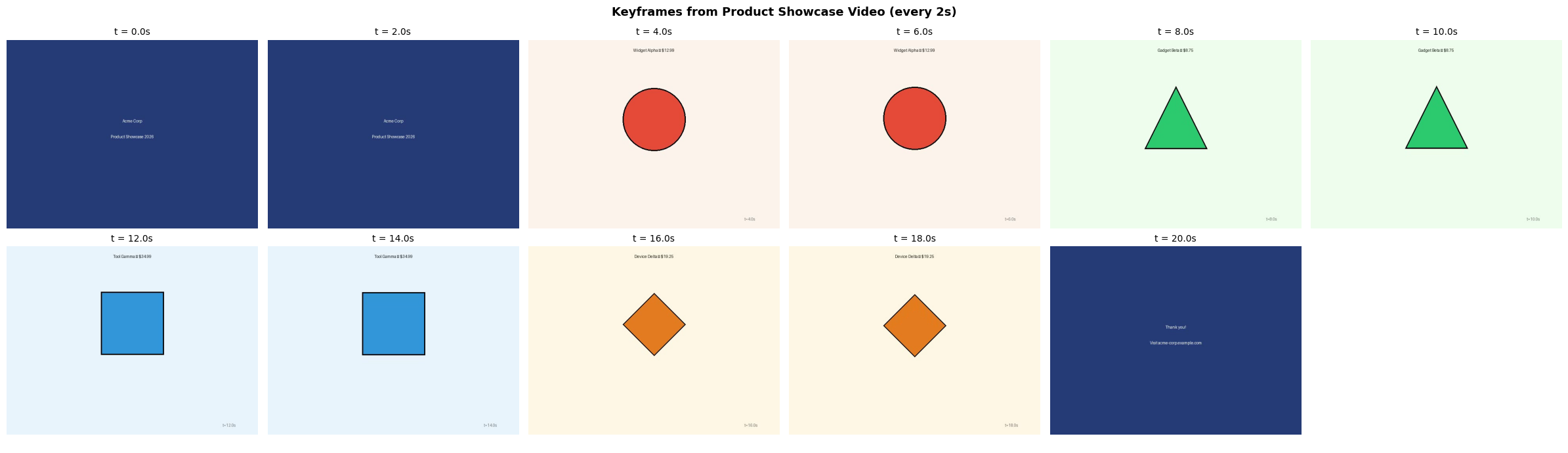
4) Build the Frame Index with CLIP Embeddings
Just like in Image RAG, we use CLIP to embed each keyframe into a 512-dimensional vector. At query time we embed the user’s text query with the same model and find the closest frame(s) by cosine similarity. The embedding and retrieval code is nearly identical to what we wrote for static images -- because once you extract keyframes, a video is just a collection of images.
The key difference from Image RAG is that each frame also carries a timestamp. This temporal metadata transforms a simple “which image matches?” answer into a richer “at what point in the video can you find this?” answer. Timestamps are what make Video RAG genuinely useful for applications like meeting recording search, surveillance review, or training video navigation.
from transformers import CLIPProcessor, CLIPModel
import torch

CLIP_MODEL_NAME = "openai/clip-vit-base-patch32"
clip_model = CLIPModel.from_pretrained(CLIP_MODEL_NAME)
clip_processor = CLIPProcessor.from_pretrained(CLIP_MODEL_NAME)

print(f"CLIP model loaded: {CLIP_MODEL_NAME}")
print(f"Embedding dimension: {clip_model.config.projection_dim}")CLIP model loaded: openai/clip-vit-base-patch32
Embedding dimension: 512
def embed_frames(keyframes, model, processor):
    """Compute CLIP embeddings for a list of keyframe images."""
    images = [kf["image"].convert("RGB") for kf in keyframes]
    inputs = processor(images=images, return_tensors="pt", padding=True)
    with torch.no_grad():
        embeddings = model.get_image_features(**inputs)
    embeddings = embeddings / embeddings.norm(dim=-1, keepdim=True)
    return embeddings.numpy()


def embed_text(query, model, processor):
    """Compute CLIP embedding for a text query."""
    inputs = processor(text=[query], return_tensors="pt", padding=True, truncation=True)
    with torch.no_grad():
        embeddings = model.get_text_features(**inputs)
    embeddings = embeddings / embeddings.norm(dim=-1, keepdim=True)
    return embeddings.numpy()


# Build the frame index
frame_embeddings = embed_frames(keyframes, clip_model, clip_processor)
print(f"Frame index built: {frame_embeddings.shape[0]} frames, {frame_embeddings.shape[1]}-dim embeddings")
Frame index built: 22 frames, 512-dim embeddings
Our frame index is now ready: 22 keyframes, each represented as a 512-dimensional CLIP vector. Notice how the code above is almost identical to the image embedding code from the Image RAG notebook -- the only difference is that our “images” come from video frames rather than from files on disk. This reuse of the same CLIP infrastructure across modalities is a powerful design pattern: once you can convert any data source into images, you get cross-modal search for free.
5) Frame Retrieval — the “Retrieval” in Video RAG
Given a text query, we:
Embed the query with CLIP’s text encoder.
Compute cosine similarity against all frame embeddings.
Return the top-k most similar frames with their timestamps.
The timestamp tells us when in the video the answer can be found.
def get_scene_for_timestamp(timestamp, scenes):
    """Look up which scene a timestamp belongs to."""
    for scene in scenes:
        if scene["start"] <= timestamp < scene["end"]:
            return scene
    return scenes[-1]  # default to last scene


def retrieve_frames(query, frame_embeddings, keyframes, model, processor, top_k=3):
    """Retrieve the top-k most relevant video frames for a text query."""
    query_emb = embed_text(query, model, processor)
    similarities = (query_emb @ frame_embeddings.T).flatten()
    top_indices = similarities.argsort()[::-1][:top_k]

    results = []
    for idx in top_indices:
        ts = keyframes[idx]["timestamp"]
        scene = get_scene_for_timestamp(ts, SCENES)
        results.append({
            "rank": len(results) + 1,
            "frame_index": int(idx),
            "timestamp": ts,
            "scene_name": scene["name"],
            "product": scene.get("product"),
            "image": keyframes[idx]["image"],
            "similarity": float(similarities[idx]),
        })
    return results


def show_retrieved_frames(query, results):
    """Display retrieved frames side by side."""
    n = len(results)
    fig, axes = plt.subplots(1, n, figsize=(6 * n, 5))
    if n == 1:
        axes = [axes]
    for ax, r in zip(axes, results):
        ax.imshow(r["image"])
        label = f"#{r['rank']} t={r['timestamp']:.1f}s\n{r['scene_name']}\nsim={r['similarity']:.3f}"
        ax.set_title(label, fontsize=10)
        ax.axis("off")
    fig.suptitle(f'Query: "{query}"', fontsize=13, fontweight="bold")
    plt.tight_layout()
    plt.show()


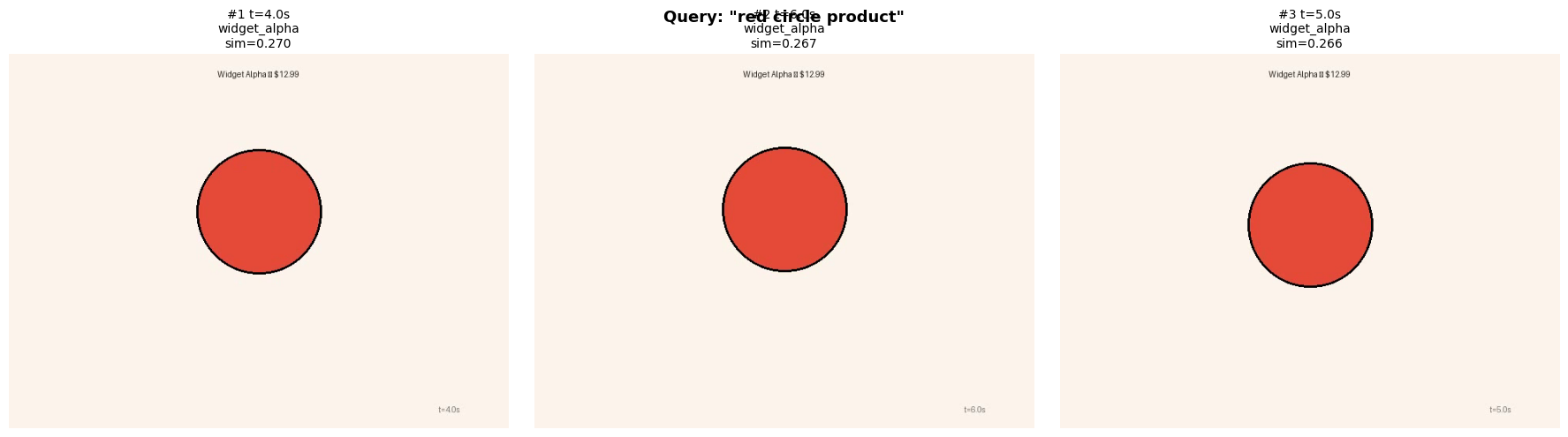
# Test retrieval
test_query = "red circle product"
results = retrieve_frames(test_query, frame_embeddings, keyframes, clip_model, clip_processor)

print(f"Query: '{test_query}'\n")
for r in results:
    prod = r['product']
    prod_str = f"{prod['name']} ({prod['color']} {prod['shape']})" if prod else "(no product)"
    print(f"  #{r['rank']} t={r['timestamp']:.1f}s | {r['scene_name']} | {prod_str} | sim={r['similarity']:.4f}")

show_retrieved_frames(test_query, results)
Query: 'red circle product'
#1 t=4.0s | widget_alpha | Widget Alpha (red circle) | sim=0.2704
#2 t=6.0s | widget_alpha | Widget Alpha (red circle) | sim=0.2670
#3 t=5.0s | widget_alpha | Widget Alpha (red circle) | sim=0.2658
6) Answer Generation — Multimodal LLM with Retrieved Frames
The multimodal LLM receives:
The retrieved frames (as images)
Metadata about each frame (timestamp, scene, product info)
The user’s question
It generates an answer grounded on what it can see in the frames and the associated timestamps.
We pass the frames through llm_cascade’s generate_multimodal() method, which handles the serialization differences between providers (Gemini uses Part.from_bytes; OpenAI-compatible providers use base64 data URIs) and automatically falls back if the first provider is rate-limited or overloaded. A “without RAG” variant below answers with no video context at all, so we can compare.
The cascade here sends frames, not the whole video file — that is the path that works across all four vision-capable providers. See the Optional section at the end of the notebook for a direct Gemini API call that takes the entire MP4 file as a single input. Gemini is the only provider in the cascade that accepts video bytes natively, which is why generate_multimodal() is frame-based for parity.
def build_frame_context(results):
    """Build a text description of retrieved frames."""
    lines = ["Retrieved video frames (ranked by visual similarity):"]
    for r in results:
        prod = r["product"]
        prod_str = (
            f"{prod['name']}: {prod['color']} {prod['shape']}, ${prod['price']:.2f}"
            if prod else "(title/closing card)"
        )
        lines.append(
            f"  #{r['rank']} timestamp={r['timestamp']:.1f}s, scene={r['scene_name']}, "
            f"product={prod_str}, similarity={r['similarity']:.3f}"
        )
    return "\n".join(lines)


VIDEO_RAG_SYSTEM_PROMPT = (
    "You are a helpful video analyst. You are given keyframes extracted from a product "
    "showcase video, along with their timestamps and metadata. Answer the user's question "
    "based on what you can SEE in the frames and the provided metadata. Reference specific "
    "timestamps when relevant (e.g., 'at t=5.0s'). If the frames do not contain enough "
    "information, say so. Do not invent products or details not shown."
)


def generate_answer_with_frames(question, results):
    """Send retrieved frames + metadata to a multimodal LLM via llm_cascade."""
    context_text = build_frame_context(results)
    prompt = f"{context_text}\n\nQUESTION: {question}"
    # Pass PIL frames directly; the cascade handles per-provider encoding.
    frames = [r["image"] for r in results]
    resp = llm.generate_multimodal(
        prompt, images=frames, system_prompt=VIDEO_RAG_SYSTEM_PROMPT)
    return resp.text, f"{resp.provider}/{resp.model}"


def generate_answer_without_rag(question):
    """Direct LLM answer with NO video frames."""
    return generate_text(question)


print("Answer generation functions ready (llm_cascade).")
Answer generation functions ready (llm_cascade).
7) Full Video RAG Pipeline
Putting it all together into a single callable function. The pipeline mirrors what we built for Image RAG -- embed the query, retrieve relevant frames, generate an answer -- but now each result includes a timestamp that grounds the answer in the video’s timeline. This is the complete Video RAG loop: from a natural-language question to a temporally grounded, visually informed answer.
def answer_with_video_rag(question, top_k=3):
    """Full Video RAG: extract frames -> CLIP retrieval -> multimodal LLM answer."""
    print(f"  [Step 1] Embedding query with CLIP ...")
    results = retrieve_frames(
        question, frame_embeddings, keyframes, clip_model, clip_processor, top_k=top_k,
    )
    print(f"  [Step 2] Retrieved {len(results)} frame(s):")
    for r in results:
        prod_name = r['product']['name'] if r['product'] else '(card)'
        print(f"           #{r['rank']} t={r['timestamp']:.1f}s — {prod_name} (sim={r['similarity']:.3f})")

    print(f"  [Step 3] Generating multimodal answer ...")
    answer, provider = generate_answer_with_frames(question, results)
    print(f"  [Step 4] Answer generated (provider: {provider})")
    return answer, results, provider


print("Video RAG pipeline ready.")
Video RAG pipeline ready.
8) Run End-to-End Examples: With RAG vs. Without RAG
We test questions about the product showcase video and compare:
With Video RAG: CLIP retrieves the relevant frame(s), multimodal LLM answers with visual + temporal grounding
Without RAG: LLM answers with no video context — it knows nothing about our product showcase
Watch how the without-RAG answers either refuse to answer (no context) or hallucinate product details.
questions = [
    "What is the red product shown in the video and how much does it cost?",
    #"At what point in the video does the green triangle appear?",
    #"What is the most expensive product in this showcase video?",
    #"What shape is the orange product?",
    "What text appears at the beginning of the video?",
]


def preview(text, max_len=800):
    text = text or ""
    return text[:max_len] + ("..." if len(text) > max_len else "")


if not has_llm_provider():
    print("Error: No LLM API key configured. Set at least one API key in Colab Secrets.")
else:
    for i, q in enumerate(questions, start=1):
        print("\n" + "=" * 80)
        print(f"Q{i}. {q}")
        print("=" * 80)

        # --- WITH VIDEO RAG ---
        print("\n--- WITH VIDEO RAG ---")
        try:
            answer_rag, retrieved, prov = answer_with_video_rag(q)
            show_retrieved_frames(q, retrieved)
            print(f"\n  Answer (provider: {prov}):")
            print(preview(answer_rag))
        except Exception as e:
            print(f"  RAG error: {e}")

        # --- WITHOUT RAG ---
        print("\n--- WITHOUT RAG (LLM knowledge only) ---")
        try:
            answer_direct, prov_direct = generate_answer_without_rag(q)
            print(f"  Answer (provider: {prov_direct}):")
            print(preview(answer_direct))
        except Exception as e:
            print(f"  Direct error: {e}")

        print()
================================================================================
Q1. What is the red product shown in the video and how much does it cost?
================================================================================

--- WITH VIDEO RAG ---
  [Step 1] Embedding query with CLIP ...
  [Step 2] Retrieved 3 frame(s):
           #1 t=6.0s — Widget Alpha (sim=0.255)
           #2 t=4.0s — Widget Alpha (sim=0.251)
           #3 t=5.0s — Widget Alpha (sim=0.250)
  [Step 3] Generating multimodal answer ...
  [Multimodal response from Gemini / gemini-2.5-flash]
  [Step 4] Answer generated (provider: Gemini/gemini-2.5-flash)
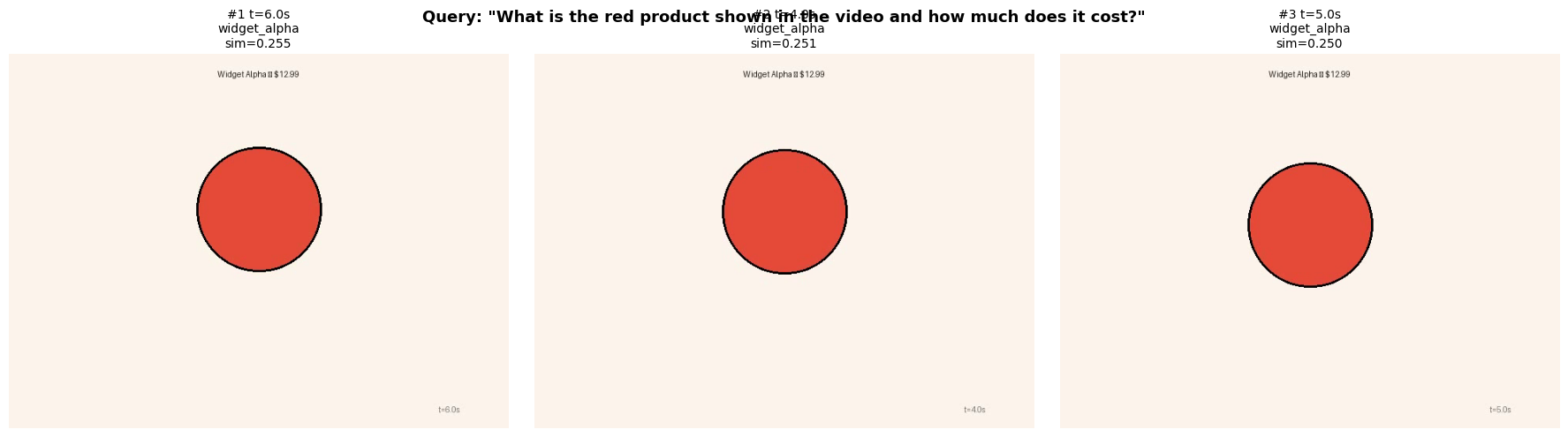
  Answer (provider: Gemini/gemini-2.5-flash):
The red product shown in the video is a "Widget Alpha", as indicated by the metadata and text overlay in the frames (e.g., at t=6.0s). It costs $12.99.

--- WITHOUT RAG (LLM knowledge only) ---
  [Response from Gemini / gemini-2.5-flash]
  Answer (provider: Gemini/gemini-2.5-flash):
I'm sorry, I cannot answer the question about the red product and its cost. The provided context does not include any information about a video or a red product. Therefore, I'm unable to identify what you're referring to or provide details about its cost.


================================================================================
Q2. What text appears at the beginning of the video?
================================================================================

--- WITH VIDEO RAG ---
  [Step 1] Embedding query with CLIP ...
  [Step 2] Retrieved 3 frame(s):
           #1 t=6.0s — Widget Alpha (sim=0.258)
           #2 t=4.0s — Widget Alpha (sim=0.257)
           #3 t=5.0s — Widget Alpha (sim=0.255)
  [Step 3] Generating multimodal answer ...
  [Multimodal response from Gemini / gemini-2.5-flash]
  [Step 4] Answer generated (provider: Gemini/gemini-2.5-flash)
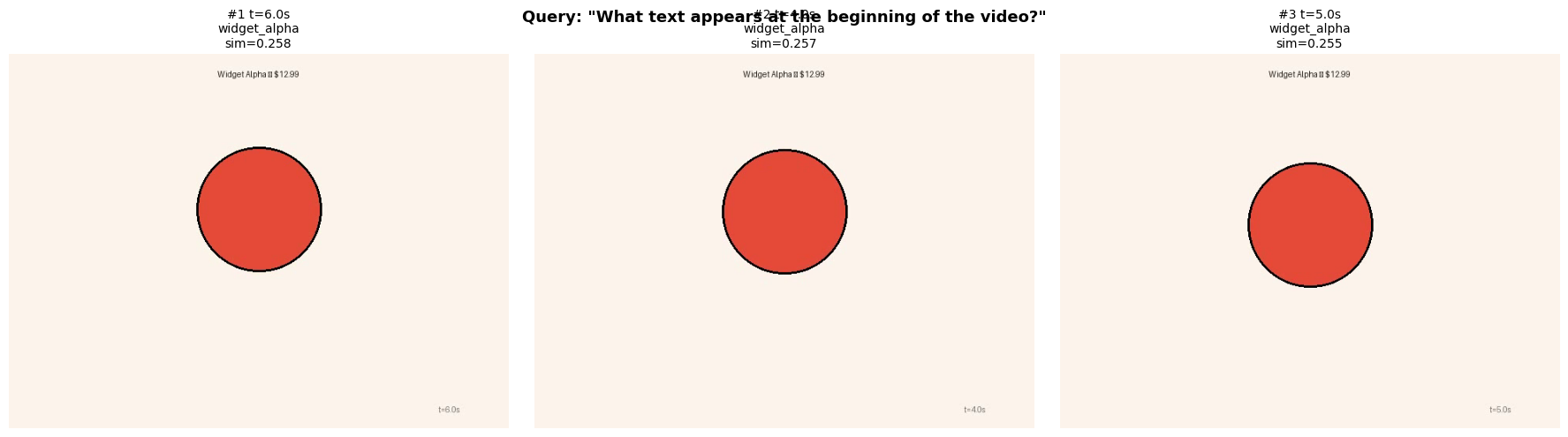
  Answer (provider: Gemini/gemini-2.5-flash):
The provided frames show the text "Widget Alpha $12.99" at the top of the screen at timestamps t=4.0s, t=5.0s, and t=6.0s. However, these frames do not capture the very beginning of the video, so I cannot determine what text appeared at the absolute beginning.

--- WITHOUT RAG (LLM knowledge only) ---
  [Response from Gemini / gemini-2.5-flash]
  Answer (provider: Gemini/gemini-2.5-flash):
The video begins with the text "How do humans learn to speak?"
Checkpoint: Reflection Questions
Temporal grounding: Did the RAG answers include timestamps? How useful is knowing when in the video something appears?
Without-RAG failure: The LLM has never seen our synthetic video — what kind of responses did it give? Refusal? Hallucination?
Frame sampling: We sampled 1 frame/second. What would happen with 1 frame every 5 seconds? Every 0.5 seconds?
Comparison with Image RAG: What extra complexity does the temporal dimension add over static Image RAG?
9) Interactive Query (Optional)
Ask your own questions about the product showcase video.
# Change this to any question about the product showcase video
my_question = "How many products are shown in total, and what are their prices?"

if has_llm_provider():
    print(f"Question: {my_question}\n")

    print("=" * 60)
    print("WITH VIDEO RAG:")
    print("=" * 60)
    try:
        answer, retrieved, provider = answer_with_video_rag(my_question, top_k=4)
        show_retrieved_frames(my_question, retrieved)
        print(f"\nAnswer ({provider}):\n{answer}")
    except Exception as e:
        print(f"Error: {e}")

    print("\n" + "=" * 60)
    print("WITHOUT RAG:")
    print("=" * 60)
    try:
        answer_direct, prov_direct = generate_answer_without_rag(my_question)
        print(f"\nAnswer ({prov_direct}):\n{answer_direct}")
    except Exception as e:
        print(f"Error: {e}")
else:
    print("No LLM API key configured. Set at least one API key in Colab Secrets.")
Question: How many products are shown in total, and what are their prices?
============================================================
WITH VIDEO RAG:
============================================================
[Step 1] Embedding query with CLIP ...
[Step 2] Retrieved 4 frame(s):
#1 t=14.0s — Tool Gamma (sim=0.246)
#2 t=11.0s — Tool Gamma (sim=0.243)
#3 t=13.0s — Tool Gamma (sim=0.243)
#4 t=12.0s — Tool Gamma (sim=0.241)
[Step 3] Generating multimodal answer ...
[Gemini] unavailable, trying next...
Error: Error code: 404 - {'error': {'message': 'model "qwen2.5-vl:cloud" not found', 'type': 'not_found_error', 'param': None, 'code': None}}
============================================================
WITHOUT RAG:
============================================================
[Response from Gemini / gemini-2.5-flash]
Answer (Gemini/gemini-2.5-flash):
Let's count them! There are 5 products shown in total.
Here are the products and their prices:
1. **Hand Cream:** $15
2. **Body Wash:** $25
3. **Body Lotion:** $22
4. **Body Scrub:** $30
5. **Bath Bomb Set:** $18
10) Teaching Notes and Exercises
Key takeaways:
Video RAG = frame extraction + Image RAG + temporal metadata. The video is decomposed into keyframes that are indexed and retrieved just like static images.
Timestamps add a temporal dimension that Image RAG lacks — answers can reference when in the video something occurs.
Frame sampling rate is a key design choice: too sparse and you miss content; too dense and you waste compute and storage.
The same CLIP + multimodal LLM stack from Image RAG works here — the main new component is the frame extraction step.
Without-RAG comparison is especially stark for video: the LLM has never seen the video, so it either refuses or hallucinates.
Exercises:
Download a short YouTube clip (e.g., a product review) and replace the synthetic video. How does CLIP handle real-world video frames?
Experiment with different frame sampling rates (0.5s, 2s, 5s) and measure the impact on retrieval accuracy.
Add scene change detection instead of fixed-interval sampling — extract frames only when the visual content changes significantly.
Combine video frames with audio transcription (e.g., Whisper) for a multimodal RAG that uses both visual and spoken content.
Discuss: In what business scenarios is Video RAG most valuable? (e.g., surveillance review, training video search, meeting recording Q&A, sports analytics)
Key takeaways
Video RAG reduces to Image RAG once you extract keyframes -- the same CLIP + cosine-similarity pipeline handles retrieval.
Frame sampling rate trades coverage for efficiency; one frame per second is a reasonable default for most content.
Timestamps attached to each frame let the LLM ground its answer in when something happens, not just what appears.
Multimodal LLMs receive the actual retrieved frames as images, enabling answers that read both visuals and on-screen text.
Without RAG, the model has never seen your video and will refuse or hallucinate -- retrieval is what supplies the evidence.
Optional: Raw Gemini Video API Call
The llm.generate_multimodal() method sends frames to whichever vision-capable provider is available — Gemini, Ollama Cloud, HuggingFace, or OpenRouter. But Gemini has a unique capability: it can accept the entire video file as input (not just extracted frames) and do its own internal frame sampling. This works because Gemini’s native API supports video MIME types like video/mp4 directly.
The code below shows how that looks. It’s Gemini-only — OpenAI-compatible endpoints do not accept video bytes, which is why the cascade restricts video inputs to Gemini. You might prefer this approach for short videos where letting Gemini choose its own frames beats a fixed one-frame-per-second strategy.
# Direct Gemini call on the whole video file -- Gemini-only feature that the
# cascade does not exercise for other providers.
from google import genai
from google.genai import types as genai_types
from llm_cascade.providers import _get_key

gemini_key = _get_key("GEMINI_API_KEY")
if not gemini_key:
    print("Skipping: GEMINI_API_KEY not configured.")
else:
    question = "What products appear in this video and in what order?"
    video_bytes = Path(VIDEO_PATH).read_bytes()

    client = genai.Client(api_key=gemini_key)
    parts = [
        genai_types.Part.from_text(text=question),
        genai_types.Part.from_bytes(data=video_bytes, mime_type="video/mp4"),
    ]
    resp = client.models.generate_content(
        model="gemini-2.5-flash",
        contents=parts,
        config=genai_types.GenerateContentConfig(
            thinking_config=genai_types.ThinkingConfig(thinking_budget=0),
        ),
    )
    print(f"Question: {question}")
    print(f"Video:    {VIDEO_PATH} ({Path(VIDEO_PATH).stat().st_size // 1024} KB)")
    print(f"\nAnswer:\n{resp.text}")
Question: What products appear in this video and in what order?
Video: product_showcase.mp4 (260 KB)
Answer:
Here are the products that appear in the video, in order of appearance:
1. **Widget Alpha** (a red circle)
2. **Gadget Beta** (a green triangle)
3. **Tool Gamma** (a blue square)
4. **Device Delta** (an orange diamond)
Run the code
To run this notebook, copy the URL below into your browser’s address bar. The link opens the notebook directly in Google Colab. (If your PDF viewer makes the URL clickable and lands on a broken page, copy the full text manually -- the viewer may have truncated the link at a line break.)
https://colab.research.google.com/github/KarAnalytics/code_demos/blob/main/Video_RAG.ipynb